
 The SUPER © Simplified Universal Player Encoder & Renderer is a very powerful free audio/video conversion software. It can perform so many conversions without any additional plugins or codecs. It is just unbelievably smart piece of software!
Showing posts with label super encoder. Show all posts
Showing posts with label super encoder. Show all posts
Friday, August 28, 2009
Super encoder
The SUPER © Simplified Universal Player Encoder & Renderer is a very powerful free audio/video conversion software. It can perform so many conversions without any additional plugins or codecs. It is just unbelievably smart piece of software!

Convert video to mp3
1. Open SUPER © Simplified Universal Player Encoder & Renderer and select the following settings.
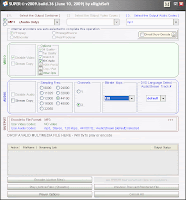
You can change the Bitrate kbps settings to increase/decrease audio quality. I have set it to 128kbps. Which is a normally used quality setting.
2. Drag and drop any video file to the super encoder file list.
3. Press Encode (Active Files) Button and in few minutes, you should have the mp3 file saved in the same folder as input file

You can change the Bitrate kbps settings to increase/decrease audio quality. I have set it to 128kbps. Which is a normally used quality setting.
2. Drag and drop any video file to the super encoder file list.
3. Press Encode (Active Files) Button and in few minutes, you should have the mp3 file saved in the same folder as input file
Convert audio to mp3
1. Open SUPER © Simplified Universal Player Encoder & Renderer and select the following settings.
You can change the Bitrate kbps settings to increase/decrease audio quality. I have set it to 128kbps. Which is a normally used quality setting.
2. Drag and drop any audio file to the super encoder file list.
3. Press Encode (Active Files) Button and in few minutes, you should have the mp3 file saved in the same folder as input file
You can change the Bitrate kbps settings to increase/decrease audio quality. I have set it to 128kbps. Which is a normally used quality setting.
2. Drag and drop any audio file to the super encoder file list.
3. Press Encode (Active Files) Button and in few minutes, you should have the mp3 file saved in the same folder as input file
Subscribe to:
Posts (Atom)
